What is an Edge?
An edge is a continuity break in an image. It represents areas in an image that marks when an object ends and another object starts.
There are a lot of techniques for edge detection, some make use of simple convolution operations while others use more advanced algorithms to perform it.
An edge is a abrupt variation of the image's texture, so mathematically, it is a strong image gradient (strong values of the first derivative)
Edge Detection Algorithms
1. Using Convolution
2. Multistage Gauss Convolution
3. Salient Structures detection
Edge detection is a "conditioning and simplification" approach, which means that, like previously saw when we talked about pre-processing and filtering, we are still transforming an image into another, only this time we are totally focused on simplifying the image.
What we do when trying to detect edges is to build another image in which the edges of the objects are the most important and relevant information.
To do that, we need to find the image's gradients for the pixels in x and y directions and take some decisions whether that gradient represents an edge or not.
Why are we simplifying the image?
What simplifying an image means is that we are trying to build another image that has a subset of information from the original one. For example, the new image could contain only the edges of an object, which is what we're investigating here.
In computer vision, what we aim, at the end of the pipeline, is to transform the image into a meaning.
For example, let's say we are classifying apples into three groups: good quality, medium quality, low quality.
Let's say that good quality apples should be sold as a top-shelf product, with a higher price tag, while medium quality apples could be sold to the general public in lower prices. Low quality apples should not be sold directly. Let's assume that they're better served economically as juice or turned into apple pies, apple biscuits, candies or any kind of industrialized food.
So, for our use case, it doesn't matter whether a particular apple has a more "red" portion of it's skin in a certain angle, nor another one has better looks when viewed from above... what we want here is to simply reduce ALL of our images into a simple integer. When it's "1", it's a top-shelf apple, it should be sold with a higher price tag. When it's "2", it's medium quality, it should be sold at a normal price. When it's "3", it's low quality, and should become juice or another product.
To make the long story short, what we do in a traditional computer vision pipeline is to remove unwanted information in every step, resulting in something that we can ultimately associate with a real programming meaning, such as an integer, an enum value and so on.
It's one of the oldest and simplest techniques for border detection. It first starts by doing a convolution with the following kernels:
The first kernel results in an Gx and the second one results in Gy. The gradient will be given by
The direction of the gradient can also be defined as follows:

- Simple to understand
- The convolution operation is very easy
Cons:
- The resulting image has one line and one row less than the original image
- The Gradient calculation involves a squared-root of squares, which are computationally expensive
- Since the convolution matrix (kernel) is so small, it tends to find a lot of garbage in the image and to miss some large borders.
import numpy as np
import matplotlib.pyplot as plt
from skimage.data import camera
from skimage.filters import roberts
image = camera()
edge_roberts = roberts(image)
fig, ax = plt.subplots(ncols=2, sharex=True, sharey=True,
figsize=(8, 4))
ax[0].imshow(image, cmap=plt.cm.gray)
ax[0].set_title('Original')
ax[1].imshow(edge_roberts, cmap=plt.cm.gray)
ax[1].set_title('Roberts Edge Detection')
for a in ax:
a.axis('off')
plt.tight_layout()
plt.show()
The Sobel operator uses two 3×3 kernels which are convolved with the original image, producing Gx and Gy, as following, where A is the source of the image.
The x-coordinate is defined here as increasing in the "right"-direction, and the y-coordinate is defined as increasing in the "down"-direction. At each point in the image, the resulting gradient approximations can be combined to give the gradient magnitude, using:
- G = |Gx| + |Gy|
Using this information, we can also calculate the gradient's direction:

import numpy as np
import matplotlib.pyplot as plt
from skimage.data import camera
from skimage.filters import sobel
image = camera()
outp = sobel(image)
fig, ax = plt.subplots(ncols=2, sharex=True, sharey=True,
figsize=(8, 4))
ax[0].imshow(image, cmap=plt.cm.gray)
ax[0].set_title('Original')
ax[1].imshow(outp, cmap=plt.cm.gray)
ax[1].set_title('Sobel Edge Detection')
for a in ax:
a.axis('off')
plt.tight_layout()
plt.show()
Pros:
- Simple to understand
- Less sensible to noise
- The convolution operation is very easy
- The operation G = |Gx| + |Gy| is computationally inexpensive
Cons:
- Since the Gradient matrix is zeroed on it's diagonals, it lacks the ability to detect borders on that part of the image.
It is similar to Sobel, but now it uses a set of eight "masks"
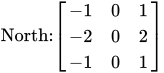
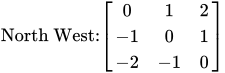
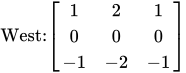
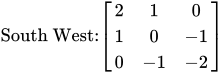
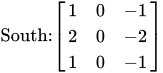
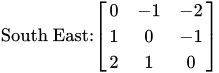
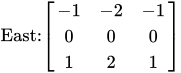
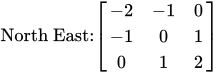
The magnitude of the gradient is the max obtained value after applying all eight masks to the pixel.
The angle of the gradient is approximated by the angle to the line of zeroes in the mask that is representing the max value. For example, if the max value mask is North, the angle is 90.
Pros:
- Simple to understand
- Less sensible to noise
- |G| is more precise
- The angle is easy to find
Cons:
- Computationally expensive, since we are dealing with 8 matrices for the convolution operation



 Pros:
Pros:
Comentários
Postar um comentário